

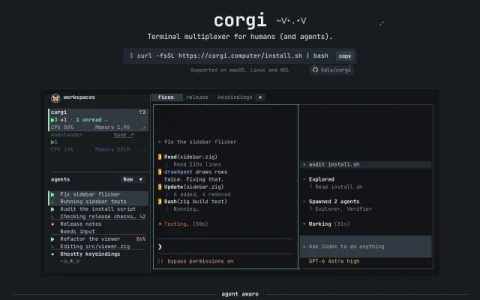
Corgi positions itself as a terminal multiplexer for humans and their agents, a lightweight layer on top of the command line that keeps AI coding sessions organized. Instead of treating each agent as just another shell, it gives every running agent a visible status and a place in a unified workspace.
The core feature set centers on awareness. A status line reports whether each agent is working, needs input, has finished, or is idle, and hovering over an agent reveals what it recently did. Token activity tracking answers the question of where usage went, while per-workspace resource monitoring shows live consumption. Like tmux, sessions persist in the background, so agents and dev servers keep running after you detach.
It also handles the practical details of modern terminal work: new tabs open directly into an agent, Ctrl-T jumps between work, worktrees are organized automatically, and image pasting works over SSH in supported terminals. Existing accounts for Claude Code, Codex, Pi, and OpenCode can be reused without extra setup.
Corgi is aimed at developers who already run one or more CLI coding agents and want persistent, observable sessions without assembling their own tmux configuration. Anyone working primarily in a single short-lived terminal session will find less value here.
To get started, install via the provided shell script on macOS, Linux, or WSL, then launch corgi and open agent tabs as needed. Use the status indicators to decide when to intervene, and check

评论与评分
0还没有评论,来写下第一条评价吧。