
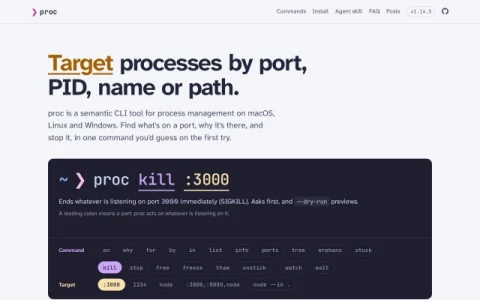
proc is a command-line utility that rethinks process management around how developers actually think about running software. Rather than requiring a PID lookup first, it accepts semantic targets such as a port number, a process name, a working directory, or a file path, and then acts on whatever matches. The tool runs on macOS, Linux, and Windows, and is distributed through Homebrew, npm, cargo, Scoop, Nix, and Docker.
The command set covers discovery and control: list processes, inspect open ports, view process trees, find orphans or stuck processes, and then kill, stop, freeze, thaw, or watch them. A leading colon denotes a port, so proc kill :3000 terminates whatever is listening there. Filters like –in, –status, –exposed, and –ancestors narrow targets, while –dry-run previews actions and confirmation prompts guard destructive ones.
It is aimed at developers and system administrators who work in terminals and regularly deal with port conflicts, leftover dev servers, zombie processes, or services that need a quick restart. Anyone debugging a local environment, such as a server that won’t start because port 3000 is occupied, will find the port-centric syntax faster than traditional tools.
New users should start with list and info to see how targets resolve, then try kill with –dry-run before running it for real. The FAQ and posts sections explain common scenarios, and the agent skill suggests integration with automated workflows. Overall, proc trades the generality


Comments & Ratings
0No comments yet. Be the first to review.