
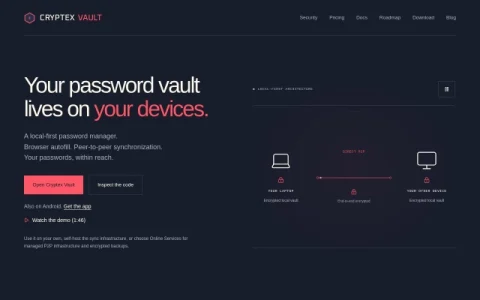
Cryptex Vault is built around a local-first architecture: your encrypted vault lives on your laptop and your other devices, and synchronization happens directly between them with end-to-end encryption. No account is required for local use, and the client is released under AGPL-3.0, so the code can be inspected and audited.
The core features are browser autofill and peer-to-peer synchronization. You can import credentials from Bitwarden, 1Password, KeePass, LastPass, Chrome, and Firefox, then open any login from a single local vault. For syncing, you can self-host the infrastructure or choose Online Services for managed P2P infrastructure and encrypted backups.
It is aimed at privacy-conscious individuals and technically comfortable users who prefer to own their password data rather than hand it to a cloud provider. Teams or families willing to run their own sync setup may also find it useful, while people who want a fully managed, zero-configuration experience may prefer a mainstream service.
A practical path is to start with local use and browser autofill, import existing passwords, and only add synchronization once you are comfortable with the model. The demo video and documentation cover the walkthrough, and the roadmap shows where the project is heading. In short, Cryptex Vault trades some convenience for device-level control over credentials.


Comments & Ratings
0No comments yet. Be the first to review.