
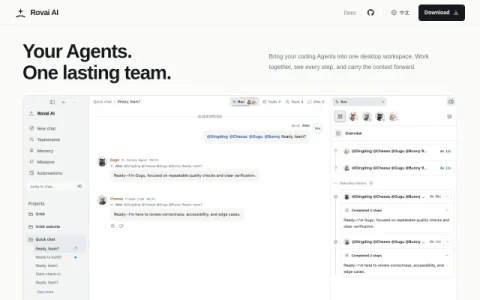
Rovai AI positions itself as a desktop workspace where coding agents become a lasting team instead of isolated sessions. Rather than starting fresh with each prompt, you assemble agents with their own roles and responsibilities, then move them from one project to the next. The product is open source and available for macOS and Windows, with documentation covering setup and daily use.
The core of the workspace is a set of connected capabilities. A mission board keeps goals, ownership, and progress in one place, while memory carries useful decisions and lessons into later tasks. Scheduled tasks assign recurring work on your own timetable, skills give teammates reusable methods, and MCP connections bring in external tools and information. You can pick the coding agent and model behind each teammate.
Remote access extends the workspace beyond the desktop. Through a browser connected to your host you can continue a conversation, and with Rovai Desktop you can send requests and receive results via Feishu, Lark, or DingTalk. This makes it possible to keep work moving when you are away from your main machine.
Rovai AI is aimed at developers and small teams who already work with multiple coding agents and want continuity across projects. It fits people who prefer structured ownership and visible progress over ad-hoc prompting. Those new to agent workflows should start with the documentation and a single teammate before expanding.
A reasonable approach is to define one or two roles


评论与评分
0还没有评论,来写下第一条评价吧。