
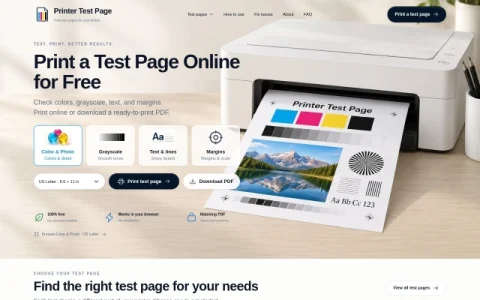
PrintPageCheck is a single-purpose web utility built around one task: producing a reliable printer test page without installing software or creating an account. The homepage presents a small set of test patterns, each targeting a different aspect of print output, and lets visitors print immediately from the browser or save a PDF for later use.
The available tests cover the common failure points. CMYK color blocks reveal missing or uneven ink coverage, a grayscale page exposes banding and tonal steps, and a text-and-lines sheet checks sharpness at labeled sizes. A margins and scale page helps confirm that edges are not cropped and that a 100 mm reference measures correctly, which is useful after changing paper settings.
Paper size selection between US Letter and A4 is handled before printing, and the downloadable PDF matches the on-screen preview, so results are consistent across devices. Because everything runs in the browser, it works on desktop and mobile alike, though mobile users will need a compatible print path to the printer.
Typical users include people setting up a new printer, checking a refilled cartridge, comparing paper stocks, or confirming that borderless and scaling options behave as expected. For best results, print at default settings first, then adjust one variable at a time when troubleshooting.
Overall, it is a lightweight, no-cost way to get a standardized test sheet quickly when something looks wrong in your printed output.


评论与评分
0还没有评论,来写下第一条评价吧。