
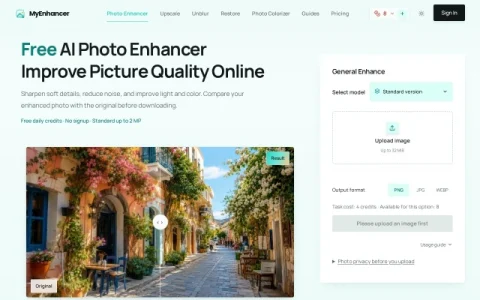
MyEnhancer is a browser-based photo enhancement service built around a single core task: improving the visual quality of existing images. Rather than bundling many editing features, it focuses on automatic correction of common photo problems such as soft focus, visible noise, and dull lighting or color. The site positions itself as a no-signup, free-to-try option for quick fixes.
The main workflow is straightforward. You upload a photo, choose a model and version, and the service processes it. A side-by-side comparison lets you inspect the enhanced result against the original before deciding to download. Output can be saved as PNG, JPG, or WEBP. The Standard version accepts input up to 2 MP and can use daily credits, while the Pro version supports up to 24 MP and requires purchased or subscription credits.
Supported formats include JPG, PNG, WebP, HEIC, AVIF, GIF, BMP, and TIFF, with static files up to 32 MiB or 100 MP. Processing copies are resized to fit the 2 MP limit on the standard tier, and animations or multi-page files are not accepted. The site states that photos are not published in a public gallery and are shared with processing services only to complete the task.
This service fits casual users, hobbyists, and small projects that need a fast quality boost for a single image. It is less suited to workflows requiring very high resolution on free credits or bulk processing without paid credits. A practical approach is to test the Standard version first, compare res



评论与评分
0还没有评论,来写下第一条评价吧。