

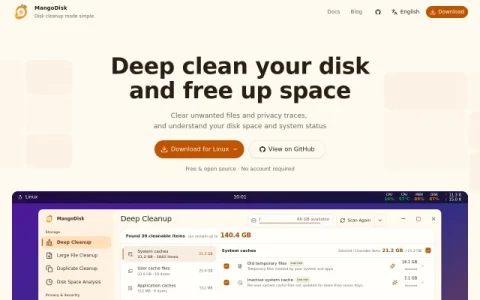
MangoDisk positions itself as a straightforward disk cleanup utility for both Windows and macOS, distributed free of charge as an open-source project. Rather than hiding behind a single “clean now” button, it opens on a storage overview that shows what is occupying space on a selected drive, so you start from evidence instead of guesswork.
The core workflow is a scan that groups findings into categories such as system caches, user cache files, application caches, browser data, and application optimization leftovers. Separate modules handle large file cleanup, duplicate detection, and disk space analysis, while a privacy section targets browsing traces. A system tools area adds an app uninstaller, startup item management, and general maintenance options.
A distinguishing feature is the optional AI explanation layer, which describes unfamiliar items in plain language before you decide to remove them. Combined with an operation history log, this makes the app more cautious than typical cleaners. The interface also surfaces live CPU, GPU, memory, disk, and battery readings, giving context while you work.
It fits users who prefer to inspect and choose rather than trust automation: technically comfortable Windows and Mac owners, people maintaining older machines with tight storage, and anyone who wants an auditable, no-signup tool. Those seeking fully automatic scheduled cleaning may find the manual review step slower.
A practical approach is to run a scan, sort by size, and re




评论与评分
0还没有评论,来写下第一条评价吧。