

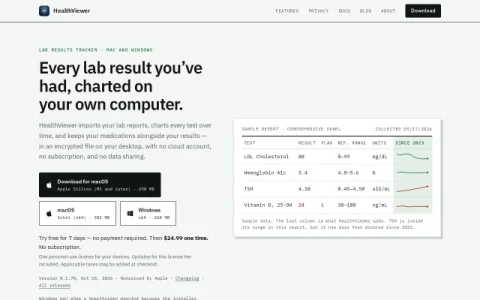
HealthViewer is a desktop application for keeping a personal history of laboratory test results. Rather than logging into a portal for each clinic, you import reports into one place and see every measurement charted over time. The app is built for Mac and Windows and is positioned around privacy: your data stays on your computer instead of a vendor’s servers.
The core workflow is import, chart, and annotate. You can bring in lab reports as PDFs or pull them from a patient portal, and HealthViewer extracts the individual tests so each one becomes a time series. A sample comprehensive panel shows values such as LDL cholesterol, HbA1c, TSH and vitamin D with reference ranges, flags and a comparison to earlier years. Medications can be recorded alongside results, giving context to changes in your numbers.
Storage is an encrypted file on your desktop, with no cloud account, no subscription and no data sharing. A single personal-use license covers your devices, costs $24.99 one time, and includes updates for that tier. A seven-day free trial requires no payment details.
It is aimed at individuals who track their own bloodwork, especially those managing a chronic condition or comparing results across multiple providers. Because everything is local, you are responsible for backups and for moving the file between machines. The Windows installer is not yet code-signed, so SmartScreen shows a warning that you dismiss via More info and Run anyway. The software is at version 0.1.70, so




评论与评分
0还没有评论,来写下第一条评价吧。