

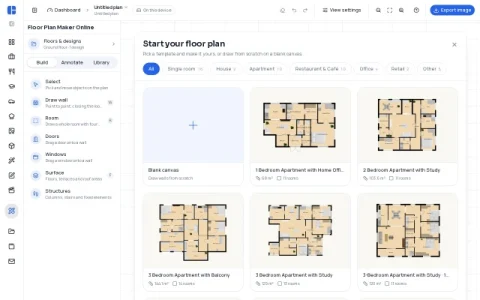
FloorAI’s floor plan maker is a browser-based drawing tool aimed at people who need a readable plan quickly, not a full CAD suite. It opens with a choice between 49 editable layouts—apartments, houses, cafés, bars, offices, shops, gyms, and single rooms—or a blank canvas, so you can either adapt an existing structure or build from scratch.
The core editor covers the essentials of plan drawing: point-to-point wall drawing that closes into rooms, one-click four-wall rooms, and drag-and-drop doors and windows onto walls. You can annotate surfaces like floors, terraces, and roof areas, place structural elements such as columns and stairs, and furnish each room from a built-in library. Dimensions can be entered in meters or feet for scale accuracy.
Finished plans export as PNG, PDF, SVG, or DXF, which makes the tool useful beyond simple sketches—DXF in particular allows the drawing to continue in CAD software. Plans are saved on the device rather than an account, so the workflow stays private but is tied to the browser you use.
The site also links to related generators for office, restaurant, classroom, garage, and kitchen layouts, plus image-to-plan and plan-to-3D converters, which helps if you want to move from a reference image or visualize a finished layout in three dimensions.
For a quick apartment layout, a café seating plan, or a classroom arrangement, FloorAI offers a low-friction starting point with no sign-up and no cost to begin.




评论与评分
0还没有评论,来写下第一条评价吧。