
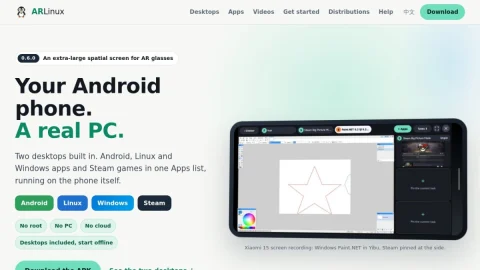
ARLinux is a project that turns an Android phone into a usable desktop computer. It ships two Debian-based desktop environments inside a single APK, aiming to give phones a real PC experience without requiring root access, a separate computer or cloud services.
The core feature is the choice of two desktops. Yibu is designed for phone screens, giving one app the main area while up to three more stay live at the side, with full screen available when needed. Classic offers free, overlapping windows that can be moved and resized by their title bars, closer to a traditional PC. Both are Debian-based, start offline and share the same apps list, which covers Android, Linux and Windows apps as well as Steam games running on the phone itself.
It is aimed at users who want desktop productivity or gaming from a phone, including those using AR glasses for a large spatial screen. The offline, no-root design also appeals to people who prefer local control over cloud-based alternatives.
To get started, download the APK for Android 9+ on ARM64 devices, then pick Yibu or Classic from the start screen and keep one or both as separate workspaces. Distribution downloads and guides are available on the site. Overall, ARLinux is a practical option for turning existing Android hardware into a portable desktop.

评论与评分
0还没有评论,来写下第一条评价吧。