
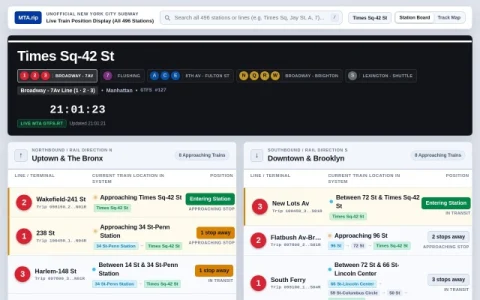
MTA.rip is an independent, unofficial display for New York City subway train positions. It organizes the system by station and line, letting you pick any of the 496 stations across Manhattan, Brooklyn, Queens, the Bronx, and Staten Island, then watch a live board for that location.
The core view pairs a station board with a track and platform diagram. Northbound and southbound directions are separated, and each entry shows the line, terminal, and the train’s current location in the system. A live track diagram highlights active cars and express bypass tracks, so you can read the corridor around a station at a glance.
Data comes from MTA GTFS-RT feeds and refreshes continuously, with a visible timestamp and update indicator. Because it is a volunteer project, it is not affiliated with or endorsed by the MTA, and feed interruptions or display quirks are possible during service disruptions.
It is most useful for riders who want spatial context rather than a simple countdown, and for transit watchers who enjoy following train movements across the network. Pick your station, check the direction, and use the diagram to judge whether a train is approaching or still several stops away.




Comments & Ratings
0No comments yet. Be the first to review.