

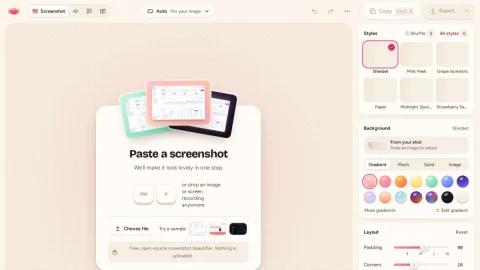
Shotcandy is a browser-based screenshot beautifier built around a single, fast workflow: paste an image and get a polished, share-ready result. It is free and open source, and all processing happens locally in the browser, so screenshots and screen recordings are never uploaded to a server.
The core toolkit includes 42 visual styles, gradient, mesh, and solid backgrounds, device frames, and auto-fit layout controls for padding and sizing. Beyond single screenshots, it offers a batch editor, multi-screen mockups, App Store screenshot sets of 3–10 slides at exact sizes, code-to-image generation with themes, social post and testimonial cards, and redaction tools.
It is aimed at indie developers, designers, and marketers who need presentable screenshots for product pages, app listings, social media, or documentation without opening a full design suite. Anyone preparing App Store assets or sharing UI work will find the preset sizes and batch flow especially useful.
To get started, paste from the clipboard, drop a file, or load the sample, then pick a style and adjust the background and padding before exporting. Use the batch editor for consistent sets, and check the redact tool before sharing anything sensitive. Overall, Shotcandy trades deep editing power for speed and privacy, making it a practical everyday utility for screenshot presentation.




Comments & Ratings
0No comments yet. Be the first to review.