

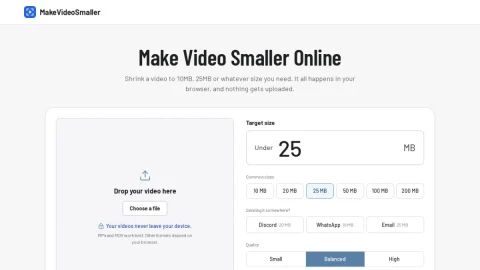
MakeVideoSmaller is a free online utility focused on one task: reducing video file size to fit a specific limit. The entire process happens locally in the browser, so clips are never uploaded to a server. Users can drop in a video, choose a target size and download the compressed result without creating an account or dealing with watermarks.
The core workflow is simple. After selecting an MP4 or MOV file, users enter a target size in megabytes or tap a preset such as 10MB, 25MB or 50MB. Presets for Discord, WhatsApp and email are also provided. A quality selector lets users favor a smaller file or more detail, and the tool calculates the bitrate needed to land under the chosen limit.
The site is aimed at people who need to share videos under platform or attachment limits, including social media users, students and professionals sending clips by email. It is not a full video editor; it is a quick compression step before sharing. Because processing is local, performance depends on the device and browser, and MP4 and MOV offer the most reliable results.
For best results, start with a common target size and a balanced quality setting, then check the before-and-after sizes shown after compression. Users should keep in mind that aggressive compression can reduce visual detail, and unusual formats may not work in every browser. Overall, MakeVideoSmaller is a focused, privacy-friendly option for everyday video size reduction.



Comments & Ratings
0No comments yet. Be the first to review.